Recreating history with transactional data (Power BI)


We want to create a measure that shows us e.g. historical account balances by using transactional data.
Why?
Often, historical data is generated by snapshot-like data-exports. The risk of failing these data integration processes that may interrupt the given time series is real. Especially in small to middle sized companies without multiple redundant backup plans and a full team working on these topics, this could potentially harm credibility of operational or even financial reports.
How?
There are multiple possibilities on how visualize history with time series data. One could - as mentioned - take snapshots of changing datasets like account balances every day at the same time. This accomplishes the goal because we can compare these values over time, but is it fail safe? Certainly not.
Consider the following tables and 1-* relationship ('Calendar'[Date] - 'fact_bank_transactional'[timestamp]):
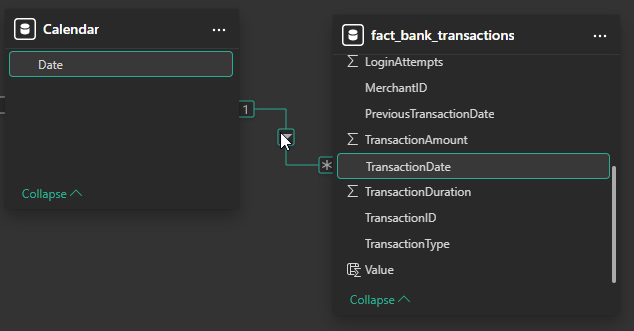
Let's take a look at the following snippet from a 'fact_bank_transactional' table:
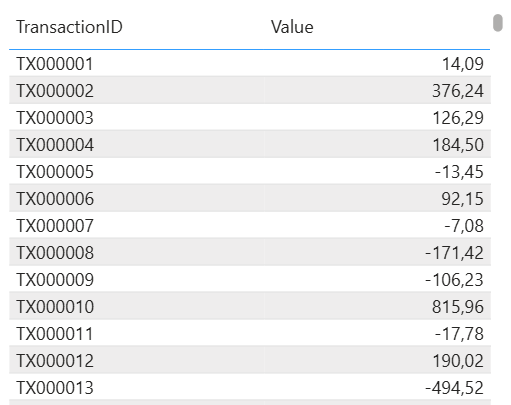
We see in- and outgoing values in form of bank transactions. To calculate the retroactive influence of these transactions on e.g. the account balance, all we have to do is to sum up all affected transactions until now:
Transactional Data =
CALCULATE(
    SUM('fact_bank_transactional'[quantity]),
    FILTER(
        ALLSELECTED('Calendar'[Date]),
        'Calendar'[Date] > MAX('fact_bank_transactional'[TransactionDate])
        )
    )
)
Let's break it down:
SUM('fact_bank_transactional'[quantity]) -> simply sums all quantities
ALLSELECTED('Calendar'[Date]) -> filters the quantities to be summed up to only filtered dates
'Calendar'[Date] > MAX('fact_bank_transactional'[TransactionDate]) -> takes the maximum + current selected date (which will be the "minimum") of the filtered dates and takes every date that is in between (without the minimum date).
This leads to a calculation where every transaction that happened gets crunched into one number only. In combination with the current account balance, this could be used to set up a line chart with dates as X-axis and the combined measure as Y-axis.
Example measure:
Historical Value =
SUM('fact_current_balance[current balance]) +
CALCULATE(
    SUM('fact_bank_transactional'[quantity]),
    FILTER(
        ALLSELECTED('Calendar'[Date]),
        'Calendar'[Date] > MAX('fact_bank_transactional'[TransactionDate])
        )
    )
)
Conclusion:
By using transactional data instead of snapshots, risk of missing data is minimized if not reduced to none. If the job fails to export data, it can just be restarted or sheduled multiple times a day without needing to worry about the scheduled start time of the job. The job can be started x-times, it will never export to less/much data if set up correctly.
All that needs to be done is to set up a job that identifies the last entered row in the reporting dataset-table and the missing rows from the origin database. This can be done by e.g. comparing auto-incrementing IDs or transaction-numbers. The missing transactions between e.g. "T00000324" and "T00000412" are self-explanatory, aren't they?
This can be used in different situations:
- recreating historical stock levels
- identifying the "last X days value" of e.g. customer sales
The used dataset can be found here.


